
01 / THE QUICK START
Let’s open
those gates.
Choose the first campaign festival for a guided challenge, or Sandbox to experiment without budget restrictions. Read the scenario’s objectives and requirements before building. Start compact: a small site is easier to supply, staff and understand.
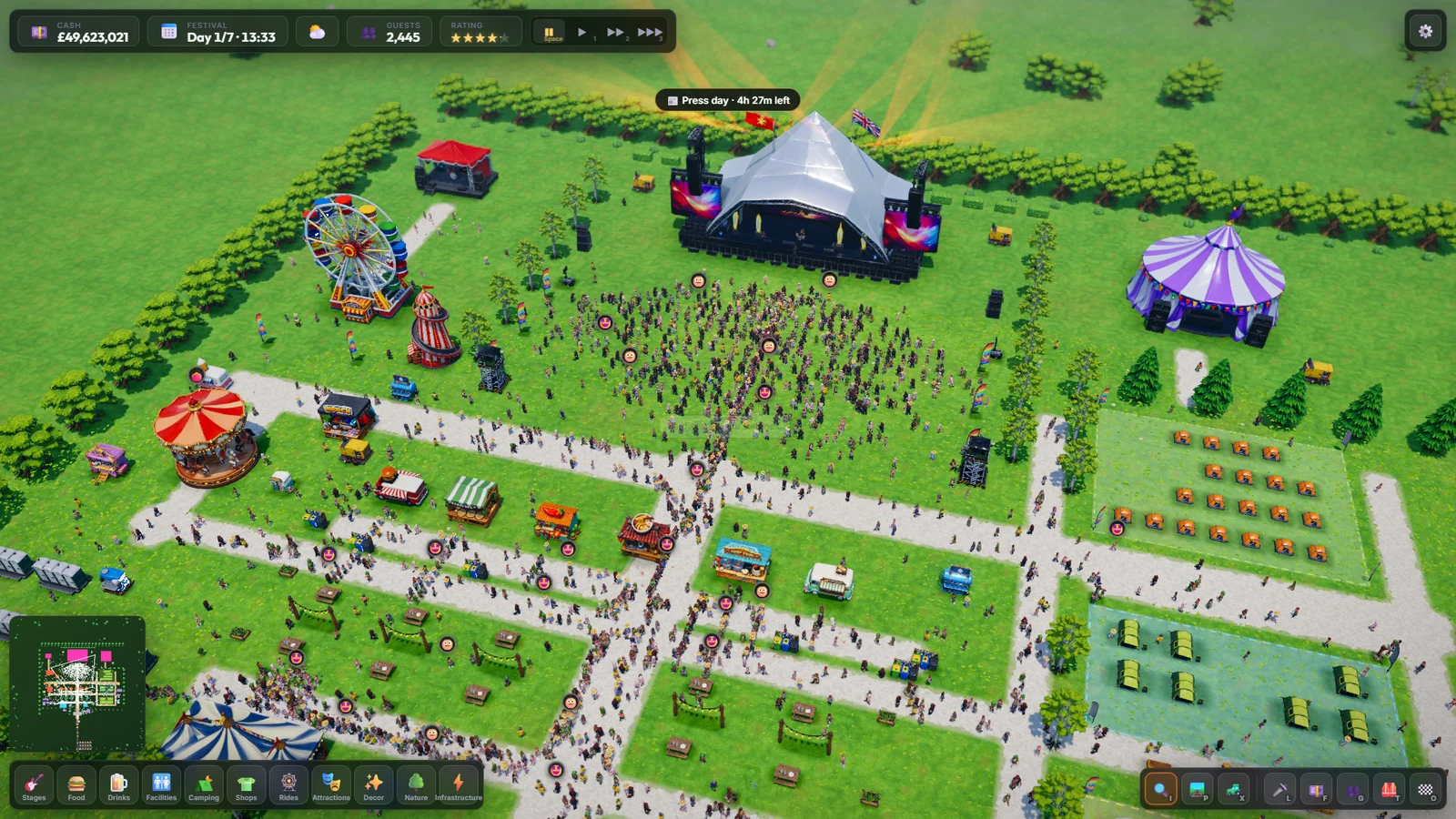
Make an entrance.
Open Infrastructure in the bottom build menu and choose Main Entrance. Its placement includes an access road and car park. Use the preview to leave space for these and for guests entering the site.
Give the music a home.
Build a stage that fits your budget. Put a Generator within range so the stage is powered. Leave a generous open area in front for the audience.
Connect the essentials.
Press P and drag to lay paths between the entrance, stage area and facilities. Add toilets, food and drinks. Place water refill points, handwash stations and bins where guests will actually spend time.
Book your first act.
Press L to open Lineup. Select an empty time on a stage, choose an available artist and check the booking requirements. You need at least one booked act to open; campaign rules may require more.
Prepare for the weekend.
Add camping if you want weekend guests. Press T to hire your crew, then F to review ticket prices, projected attendance and your finances. Keep some money back for wages and running costs.
Open, watch, adjust.
Clear the required items in the on-screen checklist, then choose Open the Gates. Start at normal speed, watch where queues form and click guests to inspect their needs. Press Space whenever you want time to think.
Before you open
Use this personal checklist alongside the game’s own requirements.
02 / KEEP THIS BIT HANDY
The controls.
| Action | Control |
|---|---|
| Pan the camera | WASD or arrow keys; middle-mouse drag |
| Rotate the camera | Q / E or right-mouse drag with no active build tool |
| Zoom | Mouse wheel |
| Jump to a location | Click the minimap |
| Open / close the build menu | B |
| Rotate a building preview | R |
| Lay paths | P, then click and drag |
| Erase paths | With the path tool active, hold Alt and drag |
| Bulldoze | X or Delete, then select what to remove |
| Return to inspection | I |
| Cancel the current tool | Right-click or Esc |
| Pause / resume time | Space |
| Normal / faster / fastest speed | 1 / 2 / 3 |
| Lineup / Finances / Guests | L / F / G |
| Staff / Objectives | T / O |
| Quick save / load quicksave | F5 / F9 |
| Close a panel or open the pause menu | Esc (cancels tools or exits following first) |
Edge scrolling can be toggled in Settings. Keyboard shortcuts do not activate while you’re typing in a text field.
03 / DESIGN THE SITE
Build with
a little breathing room.
Select a category at the bottom of the screen, choose a building and move its preview over the ground. The preview shows whether the placement is valid and explains problems such as occupied land or insufficient funds. Press R to rotate, then click to place.
Paths & access
Drag with the path tool to connect the busy parts of your site. Gravel is faster to walk on than grass or mud. Keep the front of service buildings accessible and leave room for queues, rather than packing everything against the stage.
Power & expansion
Powered facilities need a generator in range. Inspect buildings to check their status. When you run out of room, click neighbouring fields and review the lease cost; expansion must connect to land you already own.
Add decorations and landscaping after the essentials. Under Decor, drag out chill-out lawns for guests to relax. Camping areas are also drawn as zones. Save before a major redesign, especially if you plan to bulldoze a busy part of the site.
04 / GIVE THEM AN ENCORE
Book the right act.
At the right time.
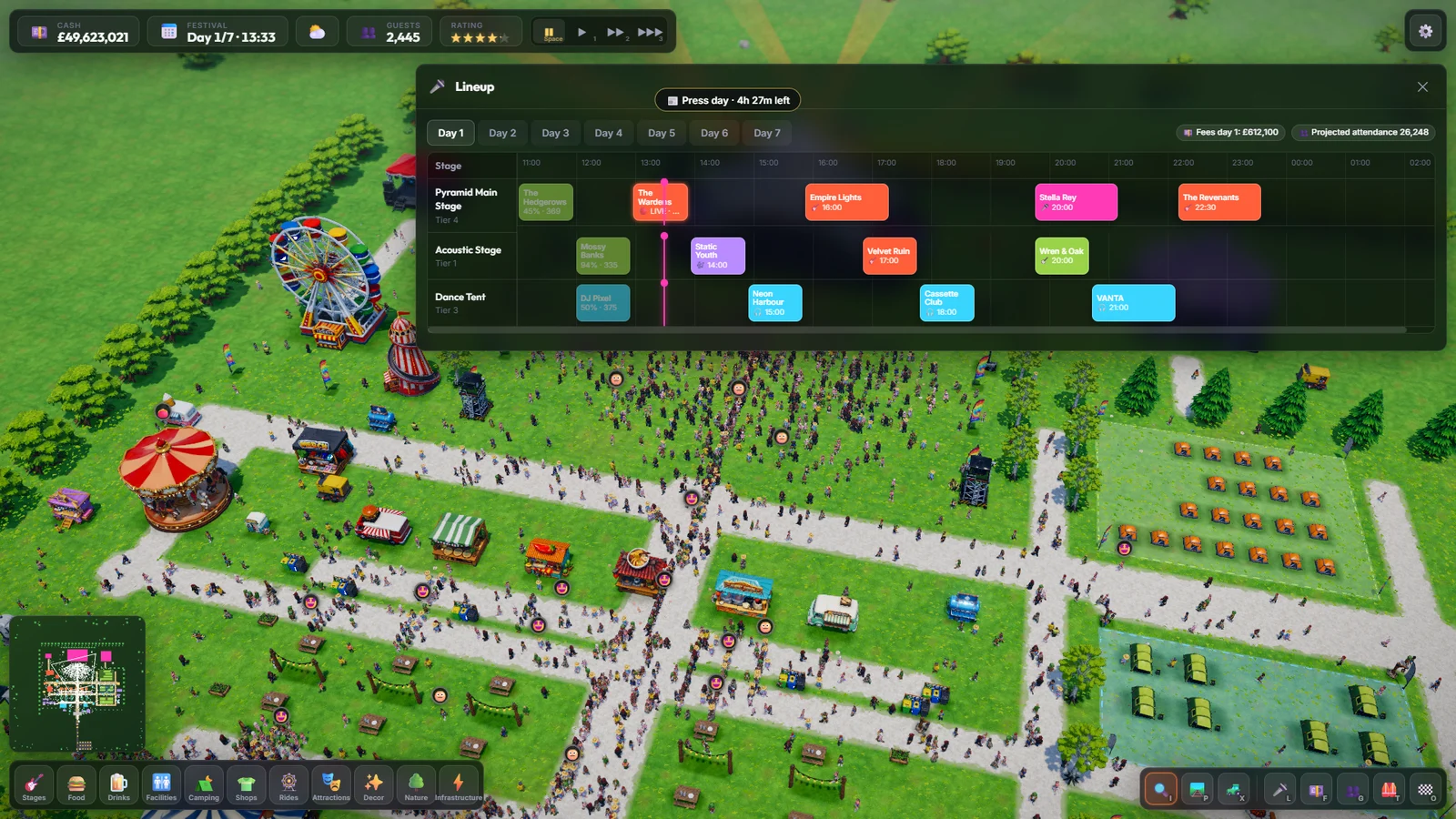
- Open Lineup with L and choose the festival day.
- Click an empty hour on the stage you want to use.
- Choose an artist and read the booking details: fee, stage requirements and rider demands.
- Leave room between sets. The booking system checks overlaps and changeover time.
- Repeat across your stages, balancing music genres and campaign requirements.
A bigger name can draw a bigger crowd, but the fee is only part of the commitment. Check that you can meet their requirements, keep the stage powered and supply the guests they attract. The game will explain why an invalid booking cannot be made.
05 / MAKE A WEEKEND OF IT
More than
a place to pitch up.
Open Camping, choose a camping type and drag out a field. The preview shows its cost and pitch capacity. Campers set up as they arrive—you don’t need to place every ordinary tent yourself.
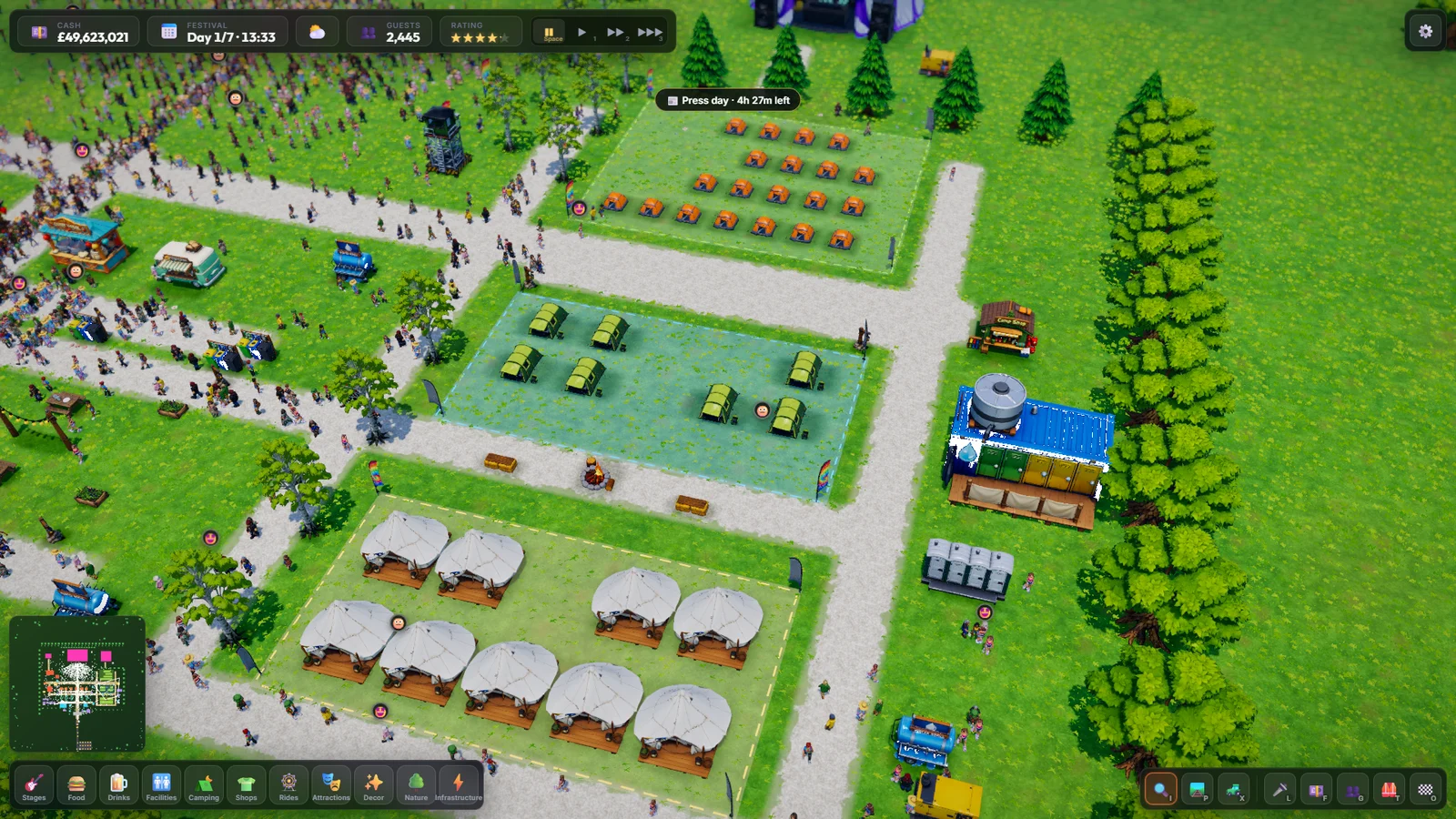
- Choose between basic, family, glamping and campervan areas to suit your plans.
- Provide paths, toilets, washing facilities, water and shops nearby.
- Weekend attendance depends on places to sleep. Check your pitch capacity before spending heavily on headline acts.
- VIP tickets require a VIP Lounge; don’t assume a glamping field alone enables them.
06 / YOUR BACKSTAGE HEROES
Hire a crew.
Look after them.
- Press T to open Staff.
- Choose Hire… beside Cleaners, Medics or Security.
- Compare applicants’ daily wages, traits and skill bars. The cheapest candidate may not be the best fit.
- Choose the candidate’s Hire button. They join the roster.
- Check their current job, energy, morale and activity as the festival runs.
Cleaners
Pick up litter and help protect the festival’s rating. Put bins near food and drink as well—staff and facilities work together.
Security
Patrol busy areas, deal with troublemakers and break up fights. Security Posts also provide guards.
Medics
Respond to collapsed guests and provide treatment. First-aid facilities are part of your safety setup.
Training & breaks
Provide a Staff Break Tent and watch energy. Training takes a staff member off duty until the next day, so keep enough cover before sending people away.
07 / LISTEN TO YOUR CROWD
Click a person.
Get the real story.
With no build tool active, click a guest to see their happiness, needs, money, tastes and current activity. Choose Focus to move the camera to them, or Follow to travel with them. Press Esc to stop following.
| Guest need | What to check |
|---|---|
| Hunger & thirst | Food, drinks, free water, accessible counters and manageable queues. Offer vegetarian food too. |
| Toilet & hygiene | Toilets, handwash stations and showers where the guests are. More facilities across the site can help more than a single distant cluster. |
| Energy | Places to rest and suitable camping for overnight guests. |
| Fun | Live sets, genre variety, rides and attractions. |
| Health | Medics, first-aid facilities and help for any active conditions or incidents. |
Press G for the wider picture: ratings, complaints and guest statistics. Use individual thoughts to understand the problem, then check whether the whole crowd is experiencing it.
A helping hand: click and drag a guest to pick them up, then release to put them down. Moving someone to the eviction zone removes them from your festival. Use this deliberately; moving people around does not replace the facilities they need.
08 / KEEP THE BUSINESS RUNNING
Great vibes.
Sensible numbers.
Press F for Finances. Before opening, set day, weekend and VIP ticket prices and review projected attendance. Your lineup, reputation, prices and camping provision affect demand.
- Keep a reserve. Artist fees, construction, wages and upkeep compete for the same cash.
- Watch income and expenses. More guests also mean more demand for food, toilets, staff and other services.
- Borrow with a plan. The finance panel shows loan terms and repayment controls. Interest is a running cost, not free spending money.
- Prices lock at opening. Review ticket prices before choosing Open the Gates.
09 / A LITTLE FESTIVAL TROUBLESHOOTING
When the plan
meets the weather.
Why can’t I open the gates?
Read the unmet requirements in the build-phase checklist. You need an entrance, a powered stage, a booked artist, toilets and food or drink. Campaign festivals may also require particular facilities or a specific lineup.
Why is a building not being used?
Check the entrance/front is accessible, the building has power if required, and guests actually need its service. Look at nearby guests’ needs and queues. A facility far from the crowd may be less useful than several close to busy routes.
Guests have low hygiene despite plenty of facilities.
Put handwashing near food, toilets and well-used paths. Check access and shower power. Use the latest build: the handwashing fix improves the priority of quick washes and lets concertgoers take hygiene breaks.
The rating is falling.
Open Guests to look at complaints, then inspect individual visitors. Check queues, litter, needs, active incidents and conditions. Hiring more staff helps with the jobs they do, but guests still need enough working facilities.
An artist won’t play or cannot be booked.
Check the stage tier, timetable, power and artist requirements. Read the booking or event message for the specific reason; larger acts may need more than a stage and a fee.
A crisis or storm has arrived.
Read the event card and its choices, costs and time limit. Pause if you need to inspect your site. Keep cash and staff available for surprises instead of spending your entire budget on expansion.
The game slows down with a large festival.
Lower graphics quality in Settings and try normal simulation speed. If an issue persists, visit Support with your PC details, guest count and a save that reproduces it.
10 / PICK YOUR OWN AMBITION
Campaign
or complete freedom.
Campaign
Progress through 10 festival scenarios with different places, objectives and lineup rules. Press O to review your current objectives. Earn reputation and unlock buildings as you work towards the WorldSound Finale.
Sandbox
Experiment without budget restrictions. You still manage a working festival: guests have needs, facilities need access and the opening checklist still matters. Use pause and time controls to develop your design at your own pace.
11 / KEEP YOUR HARD WORK
Save the festival.
Literally.
Use F5 for a quicksave and F9 to load it. Loading a save replaces your current session, so save any progress you want to keep first. For named saves, open the pause menu and choose Save Festival or Load Festival.
Settings includes graphics quality, master/music/effects volume, edge scrolling, fullscreen and an Autosave every 2 minutes option. Use named saves for milestones and before large redesigns.
Windows desktop saves are stored in %APPDATA%\festival-tycoon\saves. For troubleshooting, see the support page. The promotional website does not store or access your game saves.